September 24, 2026
6 min
An AI receptionist checks real-time schedules, matches providers and rooms, and confirms before updating, helping dental practices reschedule appointments without double-booking.
September 24, 2026
6 min
An AI receptionist checks real-time schedules, matches providers and rooms, and confirms before updating, helping dental practices reschedule appointments without double-booking.

An AI receptionist can handle dental appointment rescheduling much like a front-desk team member would, just through an automated workflow. A patient asks to move an appointment; the AI checks the practice’s scheduling system for available times, confirms which slots can be offered, and updates the appointment once the patient chooses one. If the requested time is unavailable, it can offer other openings instead of creating a second booking. The AI should also keep the original appointment in place until the new time is confirmed, so a simple reschedule request doesn’t accidentally turn into two appointments for the same patient.
A rescheduled dental appointment isn't simply a name moving from one calendar slot to another. The new time may need to match the dentist or hygienist, the procedure length, the operative, and the availability of any equipment or staff involved. When several patients are changing appointments throughout the day, one small scheduling mistake can create an overlap, leave a chair empty, or push the rest of the schedule behind.
These constraints are also why scheduling mistakes are so common at dental practices, and why a rescheduling workflow needs to account for more than just an open time slot.
For a closer look at how AI receptionists can manage these appointment changes while protecting the practice schedule, see how AI handles dental appointment rescheduling without double-booking.
When a patient says, “I need to move my cleaning next Thursday. Is there anything Friday afternoon?”, the AI doesn't simply look for an empty space and move the appointment.
It first needs to understand which appointment the patient means, check what is actually available, make sure the new slot fits the practice's scheduling rules, and only then update the booking.
A typical rescheduling workflow looks like this:
Patient request → Appointment identified → Availability checked → New slot confirmed → Original booking updated
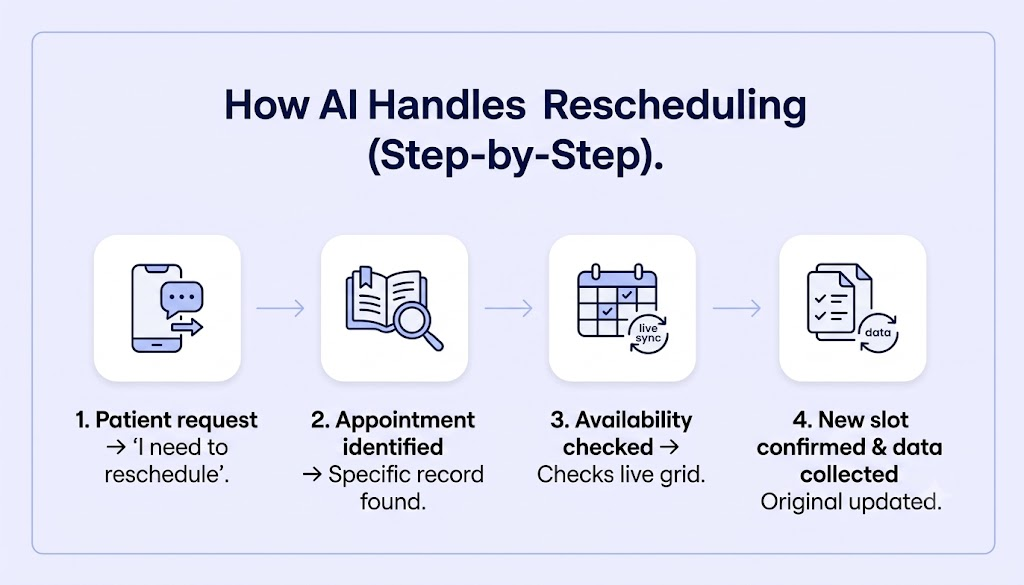
When a patient calls and says, “I'd like to move my cleaning to Friday. Do you have anything in the afternoon?”, the AI first figures out which appointment they mean and what they're looking for.
It identifies the patient, the existing appointment, and the patient's preferred date or time. This helps the AI understand that the patient wants to move an appointment that's already booked, rather than make a new one.
Once the AI knows which appointment needs to be moved, it checks the practice's connected scheduling or practice management system for available times.
It can take into account appointments already on the calendar, provider availability, blocked time, and other scheduling rules set by the practice. If a slot has been taken since the patient last checked, the AI sees the updated schedule before offering it.
That keeps the conversation tied to what's actually available, rather than relying on an outdated calendar.
3. Find a Slot That Fits
The first open spot isn't always the right one for a dental appointment.
A cleaning, crown appointment, consultation, or follow-up may have different time requirements or need a particular provider or operator. When those rules are configured in the scheduling system, the AI can use them to find an opening that fits the appointment.
So instead of simply finding an empty spot, it looks for a time that works for both the patient and the appointment.
Once the AI finds suitable options, it gives the patient a choice:
“I have Friday at 2:00 PM or Monday at 10:30 AM available. Which works better for you?”
The patient confirms the new time before the appointment is changed. Until then, the original appointment stays on the schedule.
After confirmation, the connected scheduling system can update the appointment and release the original time, depending on the integration and permissions in place.
If the selected slot gets taken before the change is completed, the AI can check availability again and offer another option instead of creating a conflict.
That whole process gives patients a faster way to reschedule while helping the front desk keep the schedule accurate and avoid accidental double-bookings.
So, how does an AI receptionist keep two patients from ending up in the same operation at the same time? It comes down to a few simple checks. Before offering a new appointment, the AI looks at what's actually available, makes sure the appointment fits, and follows the scheduling rules your practice has in place.
The AI checks your connected scheduling system before offering a time to a patient. If someone has already taken the 10:00 AM slot, it won't turn around and offer that same time to another caller.
That means patients aren't being offered times that looked open earlier but have already been filled.
An open spot on the calendar doesn't always mean it's a good spot for the appointment.
The AI can check whether the right dentist or hygienist is available, whether the operatory is open, and whether there's enough time set aside for the appointment.
For example, if Dr. Aliza is free at 2:00 PM but the operatory needed for the procedure is already occupied, the AI won't offer 2:00 PM as an option.
It looks for a time that works for the appointment, provider, and operatory together.
Every dental office has its own way of managing the schedule. You may need 30 minutes for a cleaning, longer for a crown, a buffer between certain appointments, or specific times reserved for particular providers.
Those rules can be built into the scheduling setup so the AI follows them when looking for an opening. That way, it isn't simply looking for an empty space. It's looking for an opening that actually works for your practice.
A patient wants to move an appointment. Normally, that means a call to the front desk, a search for an opening, a few back-and-forth messages, and another calendar update. When several patients need to make changes on the same day, those small tasks can quickly become a major drain on the team.
Eva, a dental AI receptionist, can easily handle your routine rescheduling by checking the practice’s scheduling rules and available openings before offering a new time. This allows your patients to choose an available slot, and the appointment can be updated without the front desk having to manage every step manually. If the request involves a scheduling situation Eva is not configured to handle, it can hand the conversation to your front desk team without delay.
That creates a smoother experience for your patients while taking repetitive scheduling work off the front desk:
For dental practices, that means fewer interruptions for the front desk and better control over a constantly changing schedule. For patients, it means moving an appointment without turning a two-minute request into a long phone call.
Effective dental appointment rescheduling is rarely about moving a patient from one time slot to another. The real difference comes from having clear scheduling rules and making sure the dentist, appointment length, operative, and available times all line up before a new slot is confirmed.
AI receptionists give dental practices a practical way to manage this process. By checking availability, applying the practice’s scheduling rules, and updating the appointment as part of the same workflow, Eva can make routine changes easier for both patients and staff.
Set the scheduling rules clearly, keep appointment information current, and give the AI a clear path for bringing in the front desk when needed. With those pieces in place, rescheduling can move from a manual task into a smoother part of the patient experience.


September 24, 2026
6 min
An AI receptionist checks real-time schedules, matches providers and rooms, and confirms before updating, helping dental practices reschedule appointments without double-booking.

September 23, 2026
6 min
AI receptionists can explain insurance verification, collect plan details, clarify billing terms, and answer payment questions, then pass complex account issues to your billing team.

September 21, 2026
9 min
Improve dental patient experiences with engagement technology that streamlines scheduling, strengthens retention, and eases front-desk workload.
Sign Up Now & Someone from Our Team Will Be in Touch Shortly!
Use the form below to send us a message, and we’ll get back to you as soon as we can.
.webp)
Track every marketing dollar and optimize patient conversions with ConvertLens. Gain valuable insights from your campaigns, ensuring you never miss a potential patient. Maximize ROI and grow your practice effortlessly.
-p-500.webp)